See what every offer pays. Before you tap Accept.
TripChecker reads each Uber and Lyft offer on your screen and shows its pay per minute, per hour and profit after gas in about a second — gold for great, green for good, red for bad, against a rule you set.
No account, nothing to sign up for — offers are read on your phone.
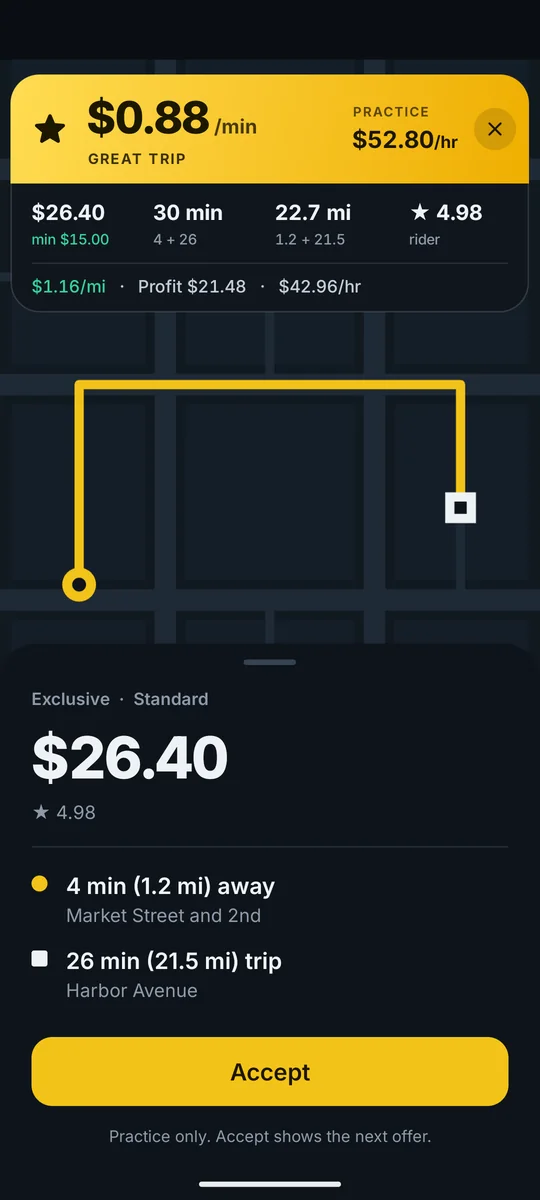
Exclusive · Standard
$26.40
★ 4.98
4 min (1.2 mi) away
Market Street and 2nd
26 min (21.5 mi) trip
Harbor Avenue
Practice only. Accept shows the next offer.
$1.16/mi·Profit $21.48·$42.96/hr
The card
Know in a second if a trip pays
The moment an offer lands, a card floats over it with pay per minute and per hour — pickup and trip counted together — plus profit after gas and wear. No math at a red light.
- Pay per minute & per hour
- Profit after fuel & wear
- Gold, green or red at a glance
- Buzz on Android, voice on iPhone
Offer lands
Lyft · $26.40 · 4 + 26 min · 22.7 mi
TripChecker reads it
$0.88/min · $52.80/hr · GREAT TRIP
Buzz on Android, voice on iPhone
“Great trip. 88 cents a minute.”
You tap Accept
Red cards? Let them go.
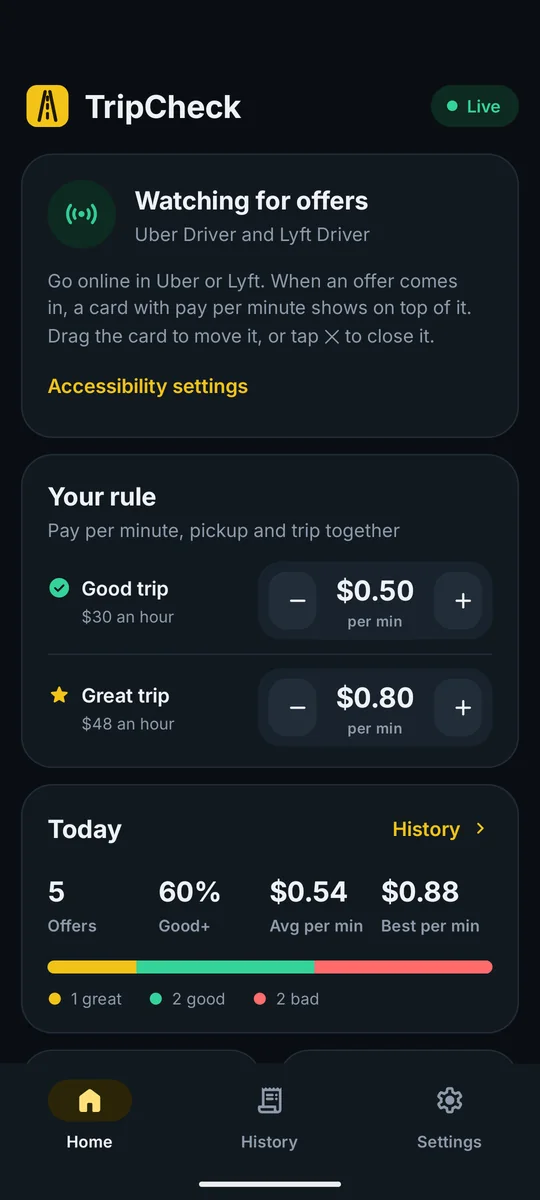
Your rule
Your bars. Your call.
Set the pay per minute that makes a trip good and the higher bar that makes it great. Ask more of great trips if you like — TripChecker holds every offer to the same rule, all shift long.
- Good & great bars per minute
- Minimum fare for great trips
- Pickup time & rider rating
- Miles or km, from your region
Everything TripChecker checks for you
Set your rule once — every offer gets the same check, in about a second.
Pay per minute & hour
Pickup and trip counted together, so a far-away pickup can't hide behind a big fare.
Profit after car costs
Fuel price, mileage and wear turn every fare into profit and profit per hour.
Uber and Lyft
Reads offers in the Uber Driver and Lyft Driver apps, on Android and on iPhone.
Avoid rules & red zones
Drop-offs by place, postal code and hour — or zones you draw — get a dark red AVOID card.
Traffic check
Optional: compares the trip time with live traffic and shows what it pays if the road is slower.
Offer history
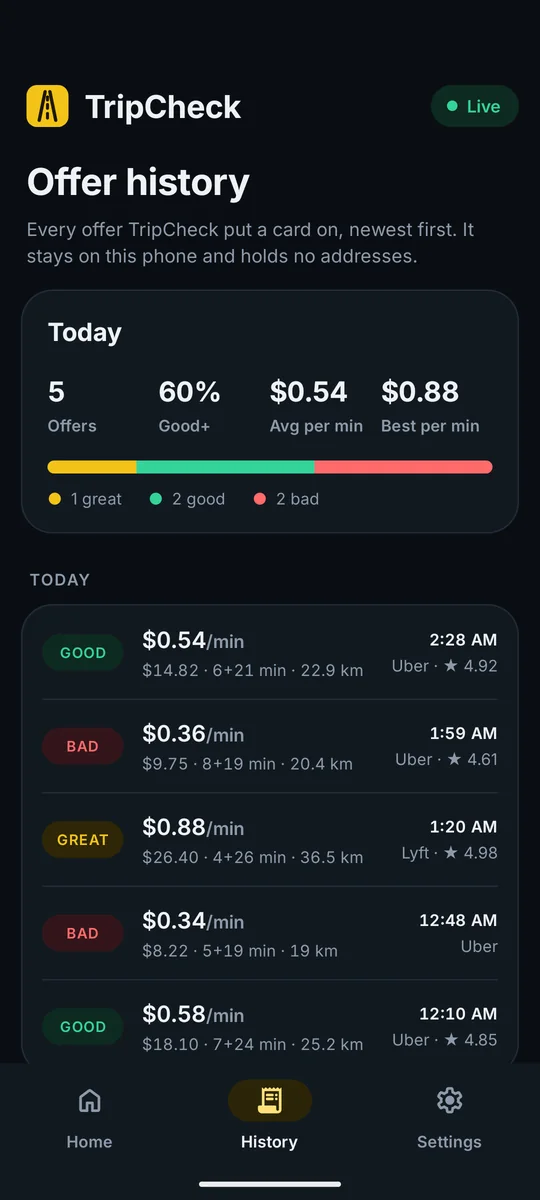
Every offer you got, with tonight's average and best pay per minute — numbers only, no addresses.
From going online to the right trip
Four steps — a minute of setup, then it reads every offer on its own.
Set your rule
Pick the pay per minute that makes a trip good and the bar that makes it great, then add your car's fuel price and mileage. Miles or kilometres, your call.
Turn on reading
On Android, switch TripChecker on in Accessibility. On iPhone, start a screen broadcast from the app — the red pill at the top shows it's reading.
Every offer gets checked
Uber or Lyft, every offer is read the moment it lands: pay per minute, per hour, profit and your avoid rules, in about a second.
Uber · $14.82
6+21 min · 14.2 mi
Lyft · $26.40
4+26 min · 22.7 mi
Lyft · $18.10
7+24 min · 15.7 mi
Uber · $9.75
8+19 min · 12.7 mi
Take the trips that pay
Tap Accept on gold and green. Let the red ones go. Your history shows how the night really went — and when to raise your bars.
- Offers
- 5
- Good or better
- 60%
- Avg per min
- $0.54
- Best per min
- $0.88
- 1 great
- 2 good
- 2 bad
Built for the way drivers work
The details that turn a calculator into a co-pilot.
Draw the zones you avoid
Circle an area on the map with your finger. Trips going into it during its hours get a dark red AVOID card — and no buzz to tempt you.
Destination rules
Avoid drop-offs that strand you: by place, by the start of a postal or ZIP code, by hour and day — and, if you like, only when the pickup is in your area.
More for a great trip
Ask more before an offer earns gold: a minimum fare, a short pickup, a well-rated rider. Anything it can't check, it won't guess.
Try it before your shift
Practice offer plays a sample offer, so you can see the card, hear the verdict and tune your bars from the couch. The calculator checks any offer you type.
Two apps, both phones
The driver apps TripChecker reads
Uber Driver and Lyft Driver, on Android and on iPhone. TripChecker reads what they show you — it isn't made by or affiliated with either.
A big fare isn't always a good trip
The fare is what the offer leads with. The minutes are what it costs you.
Chapter one — the big-fare trap
Count the pickup, and the big one shrinks
That $31.20 looks like the offer of the night — until you add the 14-minute drive to the rider. Per minute, it pays less than a quick $12.80 hop.
The $12.80 hop: 3 + 10 min → $0.98 a minute
Example offers, checked with TripChecker's default rule — good from $0.50, great from $0.80.
The big fare
$1.06/mi·Profit $24.83·$28.65/hr
The quick hop
$2.72/mi·Profit $11.78·$54.38/hr
Chapter two — a whole shift
Same bar, every offer
Hold every offer to the same per-minute bar and the night sorts itself: gold to take, green to consider, red to let go. No mood, no guessing, no tired 2 AM math.
$0.54/min
Uber · $14.82 · 6+21 min
$0.36/min
Uber · $9.75 · 8+19 min
$0.88/min
Lyft · $26.40 · 4+26 min
$0.34/min
Uber · $8.22 · 5+19 min
Example offers — pay varies by city, time and platform.
Android and iPhone · no account needed
Got an offer in mind? Check it.
Type what the offer screen showed you. It's the math TripChecker runs on every offer, rounded the same way — the app just does it for you in about a second.
$1.04/mi·Profit $11.74·$26.10/hr
iPhone says: “Good trip. 54 cents a minute.”
- Per minute
- $14.82 ÷ 27 min = $0.54
- Good needs
- $0.50 × 27 min = $13.50✓
- Great needs
- $0.80/min or more✕
- Car cost
- 14.2 mi × $0.22 = $3.08
Decide with numbers, not a hunch
What you have to go on when an offer lands — with TripChecker, with the driver app alone, and with math in your head.
| On every offer | TripChecker | Driver app alone | Mental math |
|---|---|---|---|
| Pay per minute & per hour | On every offer, in about a second | Varies by app and market | If you can, in 15 seconds |
| Counts the pickup | Pickup and trip together | Shown apart | Easy to forget |
| Profit after car costs | Fuel, mileage and wear | Not shown | A rough guess |
| Your own bars | Good, great and extra conditions | None | In your head |
| Drop-offs you avoid | Avoid rules + red zones | Destination shown | If you know the street |
| Verdict without reading | Buzz (Android) · voice (iPhone) | No | No |
| History of every offer | Numbers only, on your phone | Completed trips | No |
TripChecker reads what the driver app shows; what each driver app displays varies by market and version. TripChecker isn't affiliated with Uber or Lyft.
Your offers stay on your phone
TripChecker looks only at the Uber Driver and Lyft Driver apps, does all its reading on the phone, and keeps the numbers it needs — never addresses. There are no TripChecker servers your trips go to, and it adds no ads or tracking of its own.
It runs on your phone
Offers are read on the device; screenshots and frames are thrown away right after.
No account at all
Open the app, set your rule, drive. There's no login and nothing to sign up for.
Nothing sent by default
An offer's streets leave the phone only for the traffic check or red zones — if you turn them on.
Answers to your questions
What drivers ask before they put TripChecker on their phone.
Which apps does TripChecker work with?
Uber Driver and Lyft Driver, on Android and on iPhone. TripChecker is an independent app — it isn't made by, or affiliated with, Uber or Lyft.
What does “pay per minute” count?
The drive to the pickup and the trip together — the time the offer really takes. A $26.40 offer that's 4 minutes away and 26 minutes long pays $0.88 a minute, or $52.80 an hour.
How does it read offers on iPhone?
iOS doesn't let one app look inside another, so you start a screen broadcast from TripChecker — iOS shows a red pill at the top while it runs. Frames are read on the phone and thrown away. The verdict shows in a floating Picture in Picture card and is said out loud.
Does TripChecker accept trips for me?
Not unless you ask it to. On iPhone it can't: iOS doesn't let apps tap in other apps. On Android, auto accept and decline stay off until you turn them on, and every tap waits for a countdown you can stop. Uber and Lyft don't allow apps that tap for you and can deactivate accounts that use them — TripChecker tells you this before you switch it on.
Does it send my trips anywhere?
No. Offers are read on your phone, and the history stays there, without addresses. An offer's streets leave the phone only for the checks you turn on: the traffic check and red zones. A support report you choose to send can include the last offer's numbers, never its streets.
Miles or kilometres?
Both. TripChecker picks one from your phone's region, and you can switch in Settings — your car costs convert with it.
Can I try it without driving?
Yes. Practice offer on the Home tab plays a sample offer, so you can see the card, hear the verdict and tune your bars from the couch.
Let TripChecker do the math. You take the trips that pay.
Set your rule once, and every Uber and Lyft offer shows its pay per minute before the timer runs out.